








Gaomon S620 Drawing Tablet Review: The Ultimate Pen Tablet for Artists
In the world of digital art, choosing the right drawing tablet is crucial. If you’re in search of precision, versatility, and compatibility, look no further than the Gaomon S620 Drawing Tablet. This graphics pen tablet offers impressive features that cater to both budding artists and seasoned professionals. Let’s dive into the details and explore why the Gaomon S620 stands out in the crowded tablet market.
What is the Gaomon S620 Drawing Tablet?
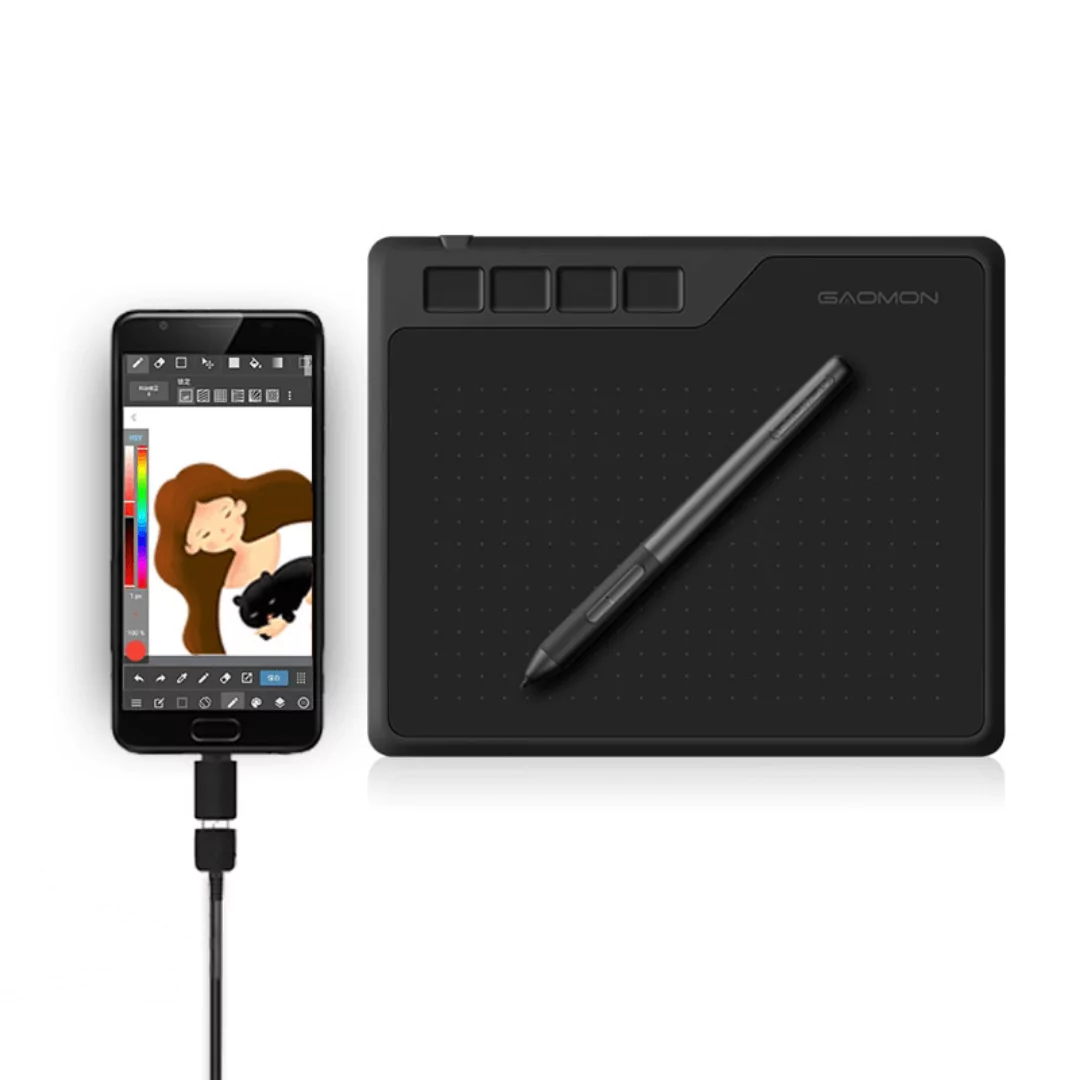
The Gaomon S620 Drawing Tablet is a high-performance graphics pen tablet designed for artists who require precision and adaptability across different platforms. Compatible with Android, Windows, and Mac, it offers an exceptional drawing experience, thanks to its 8,192 levels of pressure sensitivity. This makes it a versatile tool for creating stunning digital artwork, editing photos, and more.
Key Features of Gaomon S620 Drawing Tablet
- Pressure Sensitivity: With 8,192 levels of pressure sensitivity, the Gaomon S620 ensures precise control and variation in your strokes.
- Multi-Platform Compatibility: Seamlessly connect the tablet to Android, Windows, and Mac devices.
- Passive Pen Technology: The battery-free pen allows for uninterrupted work without the worry of charging.
- Compact and Portable: The tablet’s lightweight and slim design make it easy to carry, perfect for artists on the go.
- Customizable Buttons: Enhance your efficiency with customizable shortcut keys on the tablet and pen.
Technical Specifications of Gaomon S620 Drawing Tablet
| Feature | Details |
|---|---|
| Active Area | 6.5 x 4 inches |
| Pressure Sensitivity | 8,192 levels |
| Compatibility | Android, Windows, Mac |
| Pen Type | Battery-free |
| Connection Type | USB |
| Weight | 0.39 kg |
Benefits and Use Cases of Gaomon S620 Drawing Tablet
The Gaomon S620 Drawing Tablet is not just about impressive specs; it also delivers substantial benefits. The high-pressure sensitivity caters to nuanced color shading and line depth, crucial for professional digital artists. The compatibility across major operating systems enables you to use your favorite software without any hassle.
With its lightweight design, the Gaomon S620 is perfect for artists who frequently move between locations or attend classes and workshops. This tablet is ideal for sketching, digital painting, and even note-taking, broadening its use beyond artistic endeavors.
Pros and Cons of the Gaomon S620 Drawing Tablet
Pros:
- High-level pressure sensitivity for detailed artwork.
- Compatibility with multiple operating systems, offering flexibility.
- Battery-free pen eliminates the need for charging.
- Affordable pricing, offering great value.
- User-friendly design with customizable buttons.
Cons:
- Limited active area might not suit everyone.
- Lacks wireless connectivity, relying on USB connection.
Comparison: Gaomon S620 vs. Competitors
When comparing the Gaomon S620 Drawing Tablet with similar products in the market, it holds its ground well. Competing tablets like the Wacom Intuos offer expansive drawing areas but at higher prices. While Huion tablets provide similar pressure sensitivity, the Gaomon S620 excels with its passive pen technology, which is often reserved for higher-end models.
If affordability, portability, and compatibility are your priorities, the Gaomon S620 is a clear winner among entry-level drawing tablets.
Who Should Buy the Gaomon S620 Drawing Tablet?
The Gaomon S620 Drawing Tablet is perfect for digital artists seeking an entry-level device with professional-grade features. Students, hobbyists, and even professionals looking for a backup tablet will find it fits their needs. It’s especially suitable for those needing a portable solution without sacrificing essential features.
FAQ
Is the Gaomon S620 compatible with Mac OS?
Yes, the Gaomon S620 is fully compatible with Mac OS, ensuring you can work seamlessly on your preferred platform.
Does the Gaomon S620 Drawing Tablet need charging?
No, the pen included with the Gaomon S620 is battery-free, so it doesn’t require charging, allowing for hassle-free usage.
Can I use the Gaomon S620 for photo editing?
Absolutely, the tablet’s high precision and pressure sensitivity make it suitable for intricate photo editing tasks.
What kind of connection does the Gaomon S620 use?
The Gaomon S620 uses a USB connection, providing a stable link between the tablet and your computer or Android device.
Is the pen pressure sensitivity adjustable?
Yes, the pressure sensitivity can be adjusted in supporting software to meet your specific artistic requirements.
Final Verdict on Gaomon S620 Drawing Tablet
The Gaomon S620 Drawing Tablet offers a compelling package for both amateurs and professionals. Its combination of high pressure sensitivity, compatibility, and portability makes it an excellent choice for anyone looking to enhance their digital art experience.
If you’re ready to elevate your digital creativity, don’t hesitate. Check out the Gaomon S620 Drawing Tablet today at Alletron and start drawing like a pro.
Don’t miss out on the opportunity to own a versatile and reliable drawing companion. Click here to buy the Gaomon S620 Drawing Tablet now: https://alletron.com/gaomon-s620-drawing-tablet-graphics-pen-tablet-compatible-with-android-windows-mac-8192-levels-pressure-sensitivity/.